Whisper Karaoke Video Generator
本项目基本功能是:根据音频和封面图片,自动生成带有逐字高亮字幕的歌词视频。
1. 需求简介
最近有个给视频添加类似于 ktv 效果字幕的需求,也就是那种逐字高亮显示的歌词字幕。只想做一个简单的歌词视频,所以不想使用复杂的视频剪辑软件,也不想手动逐句对时间轴,所以做了这样一个小工具,可以从音频文件自动生成带有逐字高亮字幕的歌词视频。
整个流程基于:
- OpenAI Whisper(语音识别 + 逐字时间戳)
- ASS 字幕格式(实现 KTV 高亮效果)
- moviepy(生成图片视频)
- ffmpeg(将字幕写入视频)
项目地址:https://github.com/lxmghct/whisper-karaoke-video-generator
2. 整体流程设计
完整流程分为两个阶段:
阶段一:prepare(生成歌词草稿)
Whisper 识别音频,根据识别的歌词结果以及逐字时间戳,生成一个 ass 歌词文件。由于识别结果会有不准确,所以可以在这一步手动修改一些不准确的歌词。不过直接改 ass 比较麻烦,因为混杂大量的时间信息不好修改,所以这里会附带生成一个歌词纯文本txt文件。
阶段二:finalize(生成最终视频)
根据人工修改后的 txt 重新生成 ass,然后根据音频和封面图片直接生成一个和音频时长相同的视频,并使用 ffmpeg 写入字幕。
3. 项目结构
.
├── main.py
├── create_video.py
├── update_lyrics.py
├── convert_chinese.py
├── utils/
│   ├── sequence_diff.py
│   └── st_utils.py
└── outputs/
- main.py
- 主程序入口,负责调用 Whisper、管理流程、调用各工具模块
- update_lyrics.py
- 对比原始 Whisper 歌词与人工修正歌词,生成新的 .ass 文件
- convert_chinese.py
- 简繁转换
- create_video.py
- 使用 moviepy 根据单张图片生成匹配音频时长的视频
4. 实现思路
4.1. Whisper生成逐字的时间戳
Whisper 的调用方式如下:
model = whisper.load_model("medium")
result = model.transcribe(
    audio_file,
    language="zh",
    word_timestamps=True
)
这里需要加上word_timestamps=True参数否则没有各个字的时间戳。得到的 result 格式如下:
{
    "text": "第一段测试文本这是一段测试的文本",
    "segments": [
        {
            "id": 0,
            "seek": 5344,
            "start": 73.8,
            "end": 80.54,
            "text": "第一段测试文本",
            "tokens": [7437, 237, 15157, 8052, 97, 163, 18304, 12565, 4510, 224, 4510, 98, 51714], "temperature": 0.0,
            "avg_logprob": -0.1458473707500257,
            "compression_ratio": 1.0704225352112675,
            "no_speech_prob": 0.059459488838911057,
            "words": [
                {"word": "第", "start": 77.2, "end": 77.36, "probability": 0.9983946979045868},
                {"word": "一", "start": 77.36, "end": 77.5, "probability": 0.9944168329238892},
                {"word": "段", "start": 77.5, "end": 77.98, "probability": 0.9919532835483551},
                {"word": "测", "start": 77.98, "end": 78.12, "probability": 0.9989977777004242},
                {"word": "试", "start": 78.12, "end": 78.56, "probability": 0.9704233407974243},
                {"word": "文", "start": 78.56, "end": 79.2, "probability": 0.8886126279830933},
                {"word": "本", "start": 79.2, "end": 80.54, "probability": 0.9925932884216309}
            ]
        },
        {
            "id": 1,
            "seek": 8054,
            "start": 80.54,
            "end": 86.54,
            "text": "这是一段测试的文本",
            "tokens": [50364, 7093, 1530, 233, 25085, 23661, 230, 37486, 49640, 1546, 163, 246, 233, 18637, 224, 50664],
            "temperature": 0.0,
            "avg_logprob": -0.2546422884061739,
            "compression_ratio": 1.1142857142857143,
            "no_speech_prob": 0.003794977441430092,
            "words": [
                {"word": "这", "start": 80.54, "end": 81.34, "probability": 0.19986386597156525},
                {"word": "是", "start": 81.34, "end": 81.66, "probability": 0.8290749788284302},
                {"word": "一", "start": 81.66, "end": 82.22, "probability": 0.8470391035079956},
                {"word": "段", "start": 82.22, "end": 82.52, "probability": 0.6162168309092522},
                {"word": "测", "start": 82.52, "end": 83.12, "probability": 0.986365795135498},
                {"word": "试", "start": 83.12, "end": 83.52, "probability": 0.9633646011352539},
                {"word": "的", "start": 83.52, "end": 83.9, "probability": 0.9898779392242432},
                {"word": "文", "start": 83.9, "end": 84.42, "probability": 0.7953768372535706},
                {"word": "本", "start": 84.42, "end": 86.54, "probability": 0.9989916086196899}
            ]
        }
    ],
    "language": "zh"
}
4.2. Whisper结果转为 ass 歌词文件
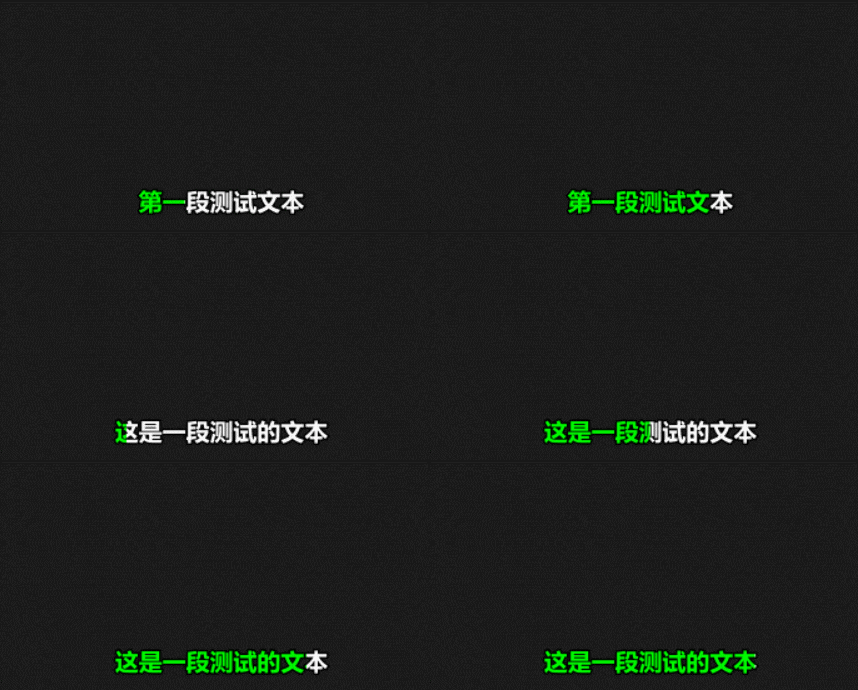
Whisper 结果里的start和end可以转为 ass 文件中的{\kf??}或者{\k??}标签用来标识每个字的持续时间。由于 ass 所需信息都有,所以可以很容易将上述结果转为 ass 歌词文件。
def whisper_to_ass(result, audio_file, output_dir):
    header = """[Script Info]
Title: Karaoke Lyrics
ScriptType: v4.00+
PlayResX: 1280
PlayResY: 720

[V4+ Styles]
Format: Name, Fontname, Fontsize, PrimaryColour, SecondaryColour, OutlineColour, BackColour, Bold, Italic, Underline, StrikeOut, ScaleX, ScaleY, Spacing, Angle, BorderStyle, Outline, Shadow, Alignment, MarginL, MarginR, MarginV, Encoding
Style: Default,Arial,48,&H0000FF00,&H00FFFFFF,&H00000000,&H64000000,-1,0,0,0,100,100,0,0,1,3,0,2,10,10,30,1

[Events]
Format: Layer, Start, End, Style, Name, MarginL, MarginR, MarginV, Effect, Text
"""

    events = []
    text_lines = []
    segments = result["segments"]

    for i, seg in enumerate(segments):
        if i == 0 or i == len(segments) - 1:
            # whisper有时会在开头或结尾添加「詞曲 李宗盛」,有则忽略
            text = seg.get("text", "")
            if "李宗盛" in text:
                continue
        words = seg.get("words", [])
        if not words:
            continue

        line_start = words[0]["start"]
        line_end = words[-1]["end"]

        ass_lyric = ""
        text = ""

        for w in words:
            dur_cs = int((w["end"] - w["start"]) * 100)
            ass_lyric += f"{{\\kf{dur_cs}}}{w['word']}"
            text += w["word"]

        events.append(
            f"Dialogue: 0,{format_ass_time(line_start)},{format_ass_time(line_end)},Default,,0,0,0,,{ass_lyric}"
        )
        text_lines.append(text)

    base_name = os.path.splitext(os.path.basename(audio_file))[0]

    ass_path = os.path.join(output_dir, "old_lyrics.ass")
    txt_path = os.path.join(output_dir, "lyrics_raw.txt")

    with open(ass_path, "w", encoding="utf-8") as f:
        f.write(header + "\n".join(events))

    with open(txt_path, "w", encoding="utf-8") as f:
        f.write("\n".join(text_lines))

    return ass_path, txt_path
转换后的示例内容如下:
[Script Info]
Title: Karaoke Lyrics
ScriptType: v4.00+
PlayResX: 1280
PlayResY: 720

[V4+ Styles]
Format: Name, Fontname, Fontsize, PrimaryColour, SecondaryColour, OutlineColour, BackColour, Bold, Italic, Underline, StrikeOut, ScaleX, ScaleY, Spacing, Angle, BorderStyle, Outline, Shadow, Alignment, MarginL, MarginR, MarginV, Encoding
Style: Default,Arial,48,&H0000FF00,&H00FFFFFF,&H00000000,&H64000000,-1,0,0,0,100,100,0,0,1,3,0,2,10,10,30,1

[Events]
Format: Layer, Start, End, Style, Name, MarginL, MarginR, MarginV, Effect, Text
Dialogue: 0,0:00:01.00,0:00:01.34,Default,,0,0,0,,{\kf15}第{\kf14}一{\kf48}段{\kf14}测{\kf43}试{\kf64}文{\kf134}本
Dialogue: 0,0:00:01.34,0:00:07.54,Default,,0,0,0,,{\kf79}这{\kf31}是{\kf56}一{\kf29}段{\kf60}测{\kf39}试{\kf38}的{\kf51}文{\kf212}本
ass文件解析:
-
在
[V4+ Style]这个标签里有一些样式,我需要用到的主要是PrimaryColour和SecondaryColour,这里的变量名可能有点反直觉,实际SecondaryColour才是字初始时的颜色,也就是进度未到达该字的颜色,而PrimaryColour才是高亮时的颜色。 -
[Events]里每一行Dialogue就是每次显示的歌词行,如果多行歌词在时间上有重叠,会自动换行显示。 -
{\kf}标签中的时间单位是百分之一秒,会平均分配给直到下一个标签之前的除空格外的所有字,比如{\kf20}测试{\kf??},这里测试这两个字每个都持续0.1秒。 -
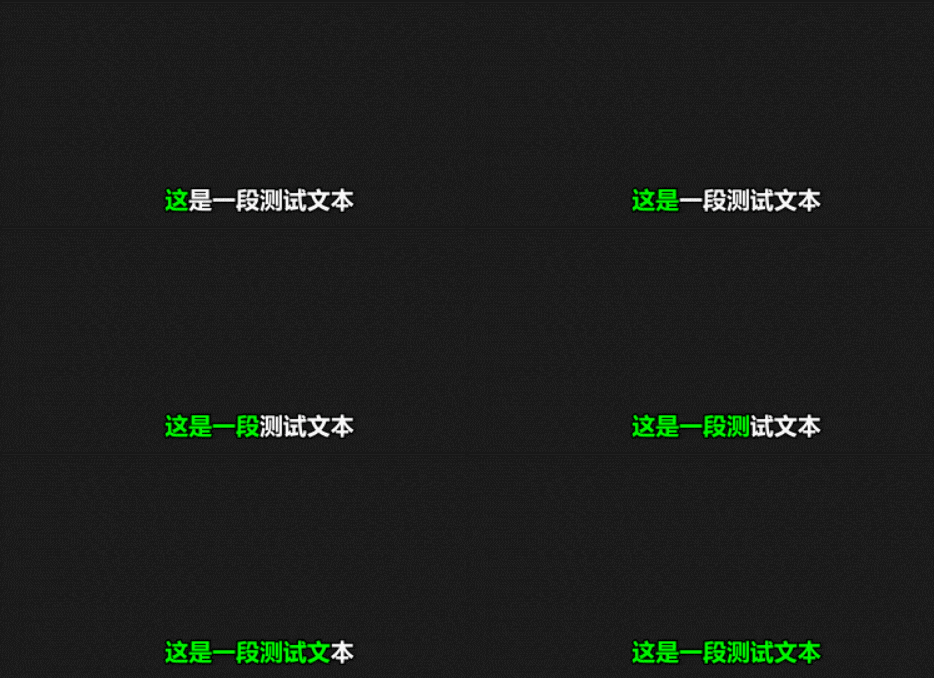
{\kf??}标签是该字渐变持续的时间,而{\k??}则会立刻切换该字的颜色并持续指定时间,并没有渐变效果。
4.3. ass 歌词文件预览
为了测试上述字幕的效果,我使用了一个开源工具 Aegisub(https://github.com/Aegisub/Aegisub),可以查看把字幕贴到视频上的效果。其界面如下图所示:
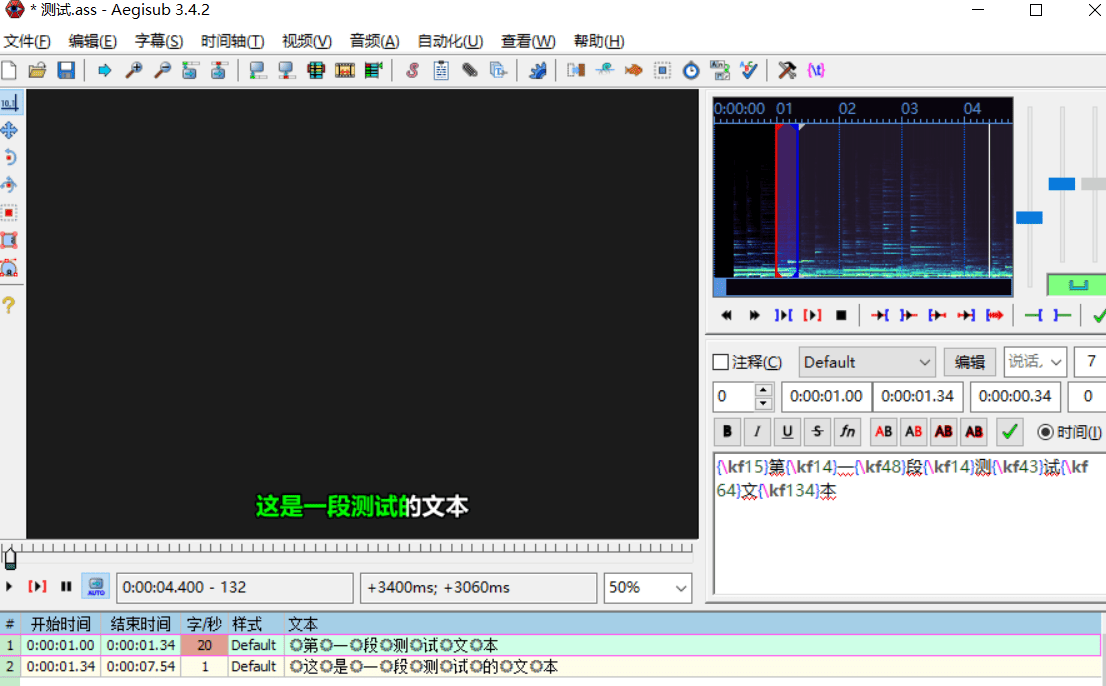
在顶部点击视频 -> 打开视频,然后点击文件 -> 打开字幕,即可预览字幕贴到视频上的效果。
上面歌词的效果如下图所示:
如果改用{\k}标签,得到的效果则如下图所示:
不过 Aegisub 并不支持直接导出该视频,所以后续还是需要用 ffmpeg 来生成最终带字幕的视频。
4.4. 歌词处理
4.4.1. 去除词曲作者
当歌词有前奏和尾奏时,Whisper 总是会在开头和结尾加上”詞曲 李宗盛“,有可能是 Whisper 训练语料的问题。所以需要统一删除开头和结尾的词曲作者。
    for i, seg in enumerate(segments):
        if i == 0 or i == len(segments) - 1:
            text = seg.get("text", "")
            if "李宗盛" in text:
                continue
4.4.2. 简繁转换
Whisper 不同模型输出的中文的简体繁体似乎并不固定,我是用medium模型基本都是繁体,但如果换成small有时输出了简体。所以这里需要统一处理一下。这里使用的方案比较简单粗暴,直接构造所有简体繁体中文字对应表。
from typing import Dict

# 简体
def simp_py_str() -> str:
    return '啊阿埃...'

# 繁体
def ft_py_str() -> str:
    return '啊阿埃...'

# 特殊/异体字
def qq_py_str() -> str:
    return '娿婀埃...'

# --- 优化构建阶段:建立映射字典 ---
def _build_maps():
    simp = simp_py_str()
    ft = ft_py_str()
    qq = qq_py_str()

    s2t_map: Dict[str, str] = {}
    t2s_map: Dict[str, str] = {}

    # 简 -> 繁
    for s, t in zip(simp, ft):
        s2t_map[s] = t
        t2s_map[t] = s

    # 异体字处理
    for q, t in zip(qq, ft):
        s2t_map[q] = t
        t2s_map[q] = simp[ft.index(t)] if t in ft else q

    return s2t_map, t2s_map

_S2T_MAP, _T2S_MAP = _build_maps()


# --- 转换函数 ---
def traditionalized(text: str) -> str:
    """简体 → 繁体"""
    if not text:
        return ''
    result = [_S2T_MAP.get(ch, ch) for ch in text]
    return ''.join(result)


def simplized(text: str) -> str:
    """繁体 → 简体"""
    if not text:
        return ''
    result = [_T2S_MAP.get(ch, ch) for ch in text]
    return ''.join(result)
4.4.3. 歌词手动修改
Whisper 识别的歌词大多数情况下会有不准确的情况,所以需要人工修正。如果直接修正 ass 文件,则非常不方便,因为 ass 文件中的歌词和时间标签穿插在一起,要改只能一个字一个字的改。所以前面的步骤里另外生成了一份纯歌词txt文件,方便快速修改。后续再根据修改后的歌词文本和 ass 歌词文件进行更新。
手动修改歌词和 ass 对照更新其实有一定的问题,比如合并时出现字数不同、歌词截断不同等情况应该以谁为基准,如何设计才能降低这部分代码的复杂度等。目前对于手动修改部分的策略是:
- 空格和换行可以任意增删,方便处理 whisper 分割歌词不正确的问题。最终歌词的分割以手动修改的这份 txt 为准。
- 歌词修改时需要确保修改前后的字数相同,不然后续合并 ass 时会出现错位。如果确实 whisper 少识别或者多识别的某几个字,则需要去 ass 文件里的对应位置也增删相应的内容。
4.4.4. 歌词修改后的文本与 ass 文件合并
合并时大体采用以下步骤:
- 提取旧歌词结构
从原来的 ass 文件里解析出:
[字, 所属dialogue行, 时间标签]
例如:
["你", 0, "kf20"]
["好", 0, "kf30"]
...
整个处理过程涉及较多对于 ass 的时间处理,而在 ass 文件中,时间最小单位是百分之一秒,所以这里建一个类统一处理:
class AssTime:
    def __init__(self, arg):
        """
        time_str: 字符串,格式为 "时:分:秒.百分秒",例如 "0:00:12.41
        """
        if isinstance(arg, int):
            self.total_hundredths = arg
        else:
            hours, minutes, rest = arg.split(':')
            seconds, hundredths = rest.split('.')
            self.total_hundredths = (int(hours) * 3600 + int(minutes) * 60 + int(seconds)) * 100 + int(hundredths)

    def add(self, add_time):
        self.total_hundredths += add_time

    def __str__(self):
        total_seconds = self.total_hundredths // 100
        remaining_hundredths = self.total_hundredths % 100

        hours = total_seconds // 3600
        remaining_seconds = total_seconds % 3600
        minutes = remaining_seconds // 60
        seconds = remaining_seconds % 60

        return f"{hours}:{minutes:02d}:{seconds:02d}.{remaining_hundredths:02d}"

    def copy(self):
        return AssTime(self.total_hundredths)
- 重新分配时间
保留原有时间标签,仅替换字符内容。只要总字数不变,每个字的时间仍然是原来的,视觉效果不变。时间精度不损失。
歌词提取:
    # 格式化旧歌词 [[word, dialogue_time_row, tag]]
    lyric_words = []
    # 存储每个dialogue的时间[start_time, end_time]
    dialogue_time_rows = []

    for i, line in enumerate(dialogue_lines):
        parts = line.strip().split(',', 9)
        dialogue_time_rows.append([AssTime(parts[1]), AssTime(parts[2])])
        lyric_part = parts[9].strip()
        j = 0
        lyric_len = len(lyric_part)
        current_lyric_word = [None, i, None]
        while j < lyric_len:
            c = lyric_part[j]
            j += 1
            if c == ' ':
                if ignore_space:
                    continue
                if current_lyric_word[2] is None:
                    lyric_words[-1][0] += ' '
                elif current_lyric_word[0] is None:
                    current_lyric_word[0] = ' '
                else:
                    current_lyric_word[0] += ' '
                continue
            if c == '{':
                t = j
                while j < lyric_len and lyric_part[j] != '}':
                    j += 1
                current_lyric_word[2] = lyric_part[t: j]
                j += 1
                continue
            current_lyric_word[0] = c if current_lyric_word[0] is None else current_lyric_word[0] + c
            lyric_words.append(current_lyric_word)
            current_lyric_word = [None, i, None]
歌词合并:
    word_index = 0
    new_word_rows = []
    total_words = len(lyric_words)
    for line in txt_lines:
        row = []
        new_word_rows.append(row)
        for c in line:
            if word_index >= total_words:
                break
            if c == ' ':
                if lyric_words[word_index][0][0] != ' ' and lyric_words[word_index - 1][0][-1] != ' ':
                    lyric_words[word_index - 1][0] += ' '
                continue
            if lyric_words[word_index][0][0] == ' ':
                lyric_words[word_index][0] = ' ' + c
            elif lyric_words[word_index][0][-1] == ' ':
                lyric_words[word_index][0] = c + ' '
            else:
                lyric_words[word_index][0] = c
            row.append(lyric_words[word_index])
            word_index += 1
上面代码里还另外处理了一下空格的问题,因为允许在手动修改的 txt 里随意增删空格,而 Whisper 生成的歌词往往会把空格放在某个歌词之前标签之后(例如{\kf20}你{\kf30} 好),经过上述代码统一处理后,统一将空格放在歌词字的前面(例如{\kf20}你 {\kf30}好),这样视觉上更自然一些。
不过还有个问题,如果修改后的歌词与原始歌词的截断不一致,而 ass 文件里每个 Dialogue 都会在开头记录整行歌词的起始和结束时间,所以这种情况就需要根据{\kf??}标签中的时间重新计算新 Dialogue 的起止时间,为方便计算,需要另外存储一下原始 ass 每一行 Dialogue 的起止时间。不过这个步骤并不是完美的,每行歌词持续时间有时是会超过每个词持续时间之和的,因为有时歌曲会有短暂的空档期。目前也就只能让新的截断歌词统一通过 start_time 来重新计算,避免从 end_time 来计算。
    # 生成新的 dialogue 行
    dialogue_example_line = dialogue_lines[0]
    example_parts = dialogue_example_line.strip().split(',', 9)

    new_dialogues = []

    word_index = 0
    for i, word_row in enumerate(new_word_rows):
        if not word_row:
            continue

        # 计算 start_time
        start_time_row_index = word_row[0][1]
        t = word_index - 1
        while t >= 0 and lyric_words[t][1] == start_time_row_index:
            t -= 1
        if t < word_index - 1:
            temp_start = dialogue_time_rows[lyric_words[t + 1][1]][0].copy()
            for p in range(t + 1, word_index):
                tag = lyric_words[p][2]
                if tag:
                    temp_start.add(int(re.search(r'\d+', tag).group()))
            start_time = temp_start
        else:
            start_time = dialogue_time_rows[start_time_row_index][0]

        # 计算 end_time (如果最后一个字恰好是该行最后一个字,则取该行end_time而非start_time加偏移量)
        word_index += len(word_row)
        end_time_row_index = word_row[-1][1]
        if word_index < total_words and lyric_words[word_index][1] > end_time_row_index:
            end_time = dialogue_time_rows[end_time_row_index][1]
        else:
            # 旧歌词的end_time会稍有偏移量,故采用start_time加偏移量的方式计算
            t = 2
            while t < len(word_row) and lyric_words[word_index - t][1] == end_time_row_index:
                t += 1
            temp_end = dialogue_time_rows[lyric_words[word_index - t][1]][0].copy()
            for p in range(word_index - t, word_index):
                tag = lyric_words[p][2]
                if tag:
                    temp_end.add(int(re.search(r'\d+', tag).group()))
            end_time = temp_end

        # 生成新的 lyric 部分
        new_lyric_part_io = StringIO()
        for w in word_row:
            if w[2]:
                new_lyric_part_io.write('{' + w[2] + '}')
            new_lyric_part_io.write(w[0])

        example_parts[1] = str(start_time)
        example_parts[2] = str(end_time)
        example_parts[9] = new_lyric_part_io.getvalue()

        new_dialogue_line = ','.join(example_parts) + '\n'
        new_dialogues.append(new_dialogue_line)
- 关于错位的处理
为方便用户体验以及代码调试,当出现错位时,最好能够精确指出错位位置,方便用户对照修改。这里使用了 Python的
difflib.SequenceMatcher来找出最长公共子串,从而定位错位位置。
difflib.SequenceMatcher 会输出:
Match(a, b, size)
表示:
ref[a:a+size]
pred[b:b+size]
是相同的。
然后可以利用 offset 判断是否发生位移
offset = match.b - match.a
如果 offset 不变,说明两个字符串在这一段是对齐的。反之说明发生了插入 / 删除 / 错位。
此外还需要注意:
- 还需要过滤短匹配,避免偶然匹配(例如单个“的”、“了”)。
- 还要过滤远距离重复,歌词中有时会有重复的句子,如果距离过远则不认为是没有对齐的。
from difflib import SequenceMatcher

def find_misalignment_intervals(ref, pred, min_match_len=3, offset_tolerance=5):
    """
    查找两个歌词字符串中的错位区间。

    参数:
        ref (str): 正确歌词
        pred (str): 识别歌词
        min_match_len (int): 最小匹配子串长度,过滤掉太短的偶然匹配
        offset_tolerance (int): 最大允许的匹配位置差,避免歌词重复误判

    返回:
        list[dict]: 错位区间列表,例如:
        [
            {"start_ref": 50, "end_ref": 120, "start_pred": 48, "end_pred": 118, "offset": -2},
            ...
        ]
    """
    matcher = SequenceMatcher(None, ref, pred)
    matches = matcher.get_matching_blocks()

    intervals = []
    prev_offset = 0

    for i, match in enumerate(matches):
        if match.size < min_match_len:
            continue

        offset = match.b - match.a

        # 跳过明显不对应的(比如副歌重复太远)
        if abs(offset) > offset_tolerance:
            continue

        if offset != prev_offset:
            last_match = matches[i - 1] if i > 0 else {"a": 0, "b": 0, "size": 0}
            inteval = {
                "start_ref": last_match.a + last_match.size,
                "start_pred": last_match.b + last_match.size,
                "end_ref": match.a,
                "end_pred": match.b,
                "offset": offset - prev_offset,
                "lyric_ref": ref[last_match.a + last_match.size: match.a],
                "lyric_pred": pred[last_match.b + last_match.size: match.b],
            }
            intervals.append(inteval)
            prev_offset = offset

    return intervals


if __name__ == "__main__":
    ref_lyric = "这是正确的歌词,用于测试错位检测功能。"
    pred_lyric = "这是错误的歌词,用于测试检测功能。"

    intervals = find_misalignment_intervals(ref_lyric, pred_lyric)
    for interval in intervals:
        print(interval)
4.5. 生成视频
我这里为了方便测试,直接使用 moviepy 根据单张图片生成一个和音频时长相同的视频,然后再用 ffmpeg 将字幕写入视频。moviepy 生成视频的代码如下:
def image_to_video(image_path, audio_path, output_path="output.mp4", volume=1.0):
    """
    生成视频:单张图片 + 背景音乐
    :param image_path: 图片路径 (jpg/png/jpeg)
    :param audio_path: 音频路径 (mp3)
    :param output_path: 输出视频路径 (默认 output.mp4)
    :param volume: 音量大小 (1.0为原音量,0.5为一半音量)
    """
    # 加载音频
    audio = AudioFileClip(audio_path).volumex(volume)
    duration = audio.duration  # 音频持续时间
    print(duration)

    # 创建图片视频片段(持续时间与音频相同)
    # clip = ImageClip(image_path, duration=duration)
    clip = ImageClip(image_path).resize(height=480, width=720).set_duration(duration)

    # 设置视频的音频
    video = clip.set_audio(audio)

    # 导出视频
    video.write_videofile(
        output_path,
        fps=24,          # 帧率
        # codec="libx264",
        # audio_codec="aac",
        # ffmpeg_params=[
        #     "-pix_fmt", "yuv420p",
        #     "-movflags", "+faststart"
        # ]
    )

    print(f"✅ 视频已生成: {output_path}")
然后使用 ffmpeg 将字幕写入视频,命令如下:
ffmpeg -i temp_video.mp4 -vf ass=lyrics.ass output.mp4
在 Python 中调用 ffmpeg:
def burn_ass(video_input, ass_path, output_path):
    # ffmpeg -i audio.mp4 -vf ass=lyrics.ass output.mp4
    # 下面的ass=参数不能用"\\"作为路径分隔符,必须使用"/"
    ass_path = ass_path.replace("\\", "/")
    subprocess.run([
        "ffmpeg",
        "-y",
        "-i", video_input,
        "-vf", f"ass={ass_path}",
        output_path
    ], check=True)
5. 总结
本项目本质上做了三件事:
- 把 Whisper 的逐字时间戳转成 ASS 字幕
- 设计一个安全的歌词手动修改机制
- 自动完成视频合成
完整代码:https://github.com/lxmghct/whisper-karaoke-video-generator